Choose a Resume Template
Pick from 880+ resume templates filtered by category: ATS-friendly, modern, minimalist, two-column, with photo, and more. Apply designs with one click.
Last updated 2026-08-19
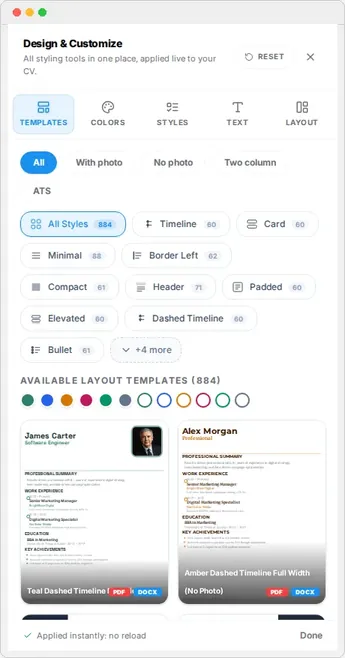
Templates control the overall look of your resume. Resume Builder HQ ships more than 880 template combinations, so you can change the entire design of your resume with one click without losing your content.
Open the template gallery
Click the floating palette button on the right edge of the preview to open the Design & Customize rail. It opens on the Templates tab by default.
Every template applies instantly to your live preview. This lets you compare designs side by side before you commit.
Filter by category
Use the category pills above the gallery to narrow the list:
- ATS-friendly - clean layouts that parse well.
- Modern, Minimalist, Classic, Creative - different visual styles.
- Two-column - sidebar layouts.
- One-page - designs built to fit a single page.
- With photo - templates that feature a profile photo.
- Word and Google Docs - familiar formats.
Tip
Colors, styles, text, and layout
A template sets the starting point for the whole design. You can then fine-tune it with the other four tabs in the rail: Colors, Styles, Text, and Layout.
Reset anytime
If you take the design too far from where you started, click Reset in the rail header to restore the default theme. Your content is never touched when you change or reset the design.