Step 4 - Highlight Your Skills
Add hard and soft skills with proficiency levels in the Skills step. Match your skills to the job description to pass ATS keyword filters.
Last updated 2026-08-19
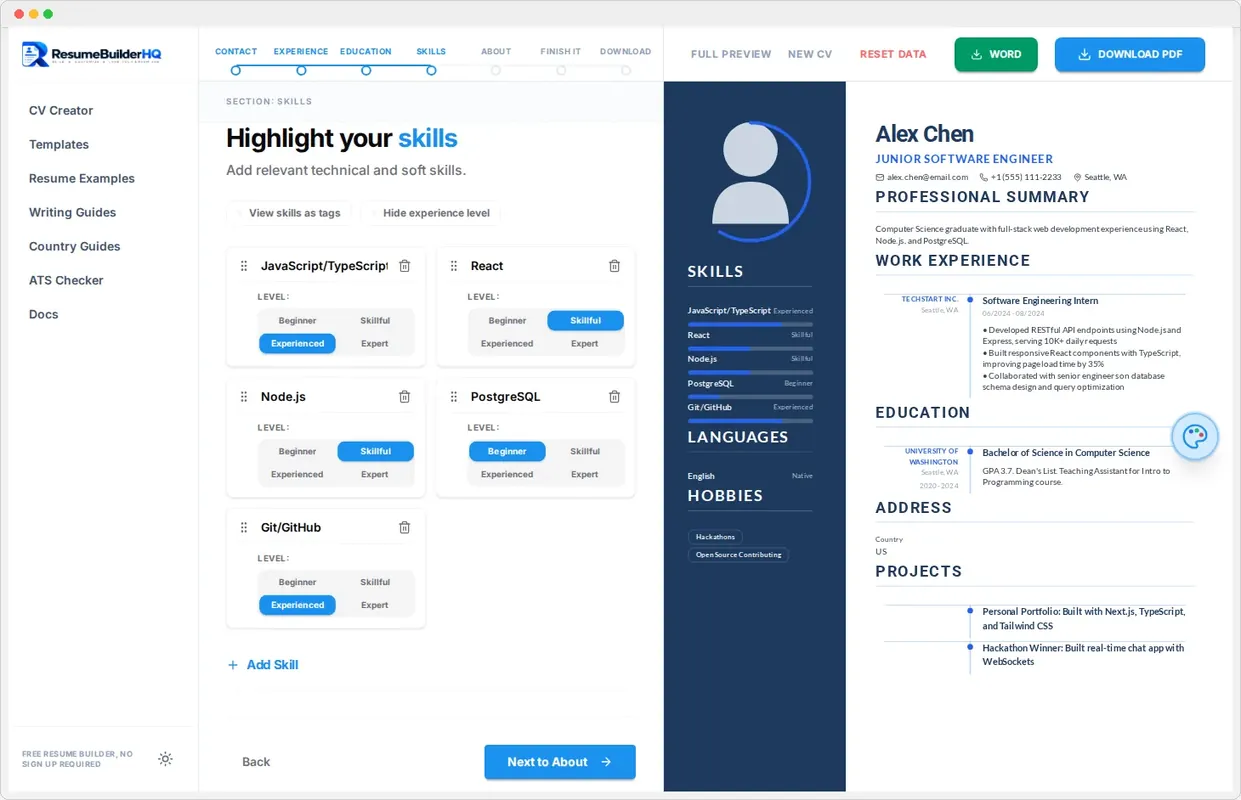
The Skills step is where you list what you can do. A well-chosen skills list helps two audiences at once: the ATS software that filters resumes, and the human recruiter who reads the shortlist.
Add your skills
Type a skill name in the Skills panel and choose a proficiency level. The builder supports three common levels, from beginner to expert. Add as many skills as you need, then remove the ones that are not relevant.
The skills render as a clean list or tag cloud in your preview, depending on your template. Keep the most important skills first.
Match the job description
The fastest way to pass an ATS filter is to mirror the employer's language. Open the job posting and note the skills it names. Include those exact terms in your skills list where they are true for you.
Tip
Keep the list focused
A focused list beats a long one. Pick the 8 to 15 skills that matter most for the role you want. Delete anything generic or outdated so the section stays easy to scan.
Continue to About
Click Continue when your skills look right to move to Step 5: About, where you write your professional summary.