Step 6 - Review & Polish Your Whole Resume
See your entire resume on one page in the Review step. Edit any section, reorder blocks, and use the Add & Navigate Sections toolbar before you download.
Last updated 2026-08-19
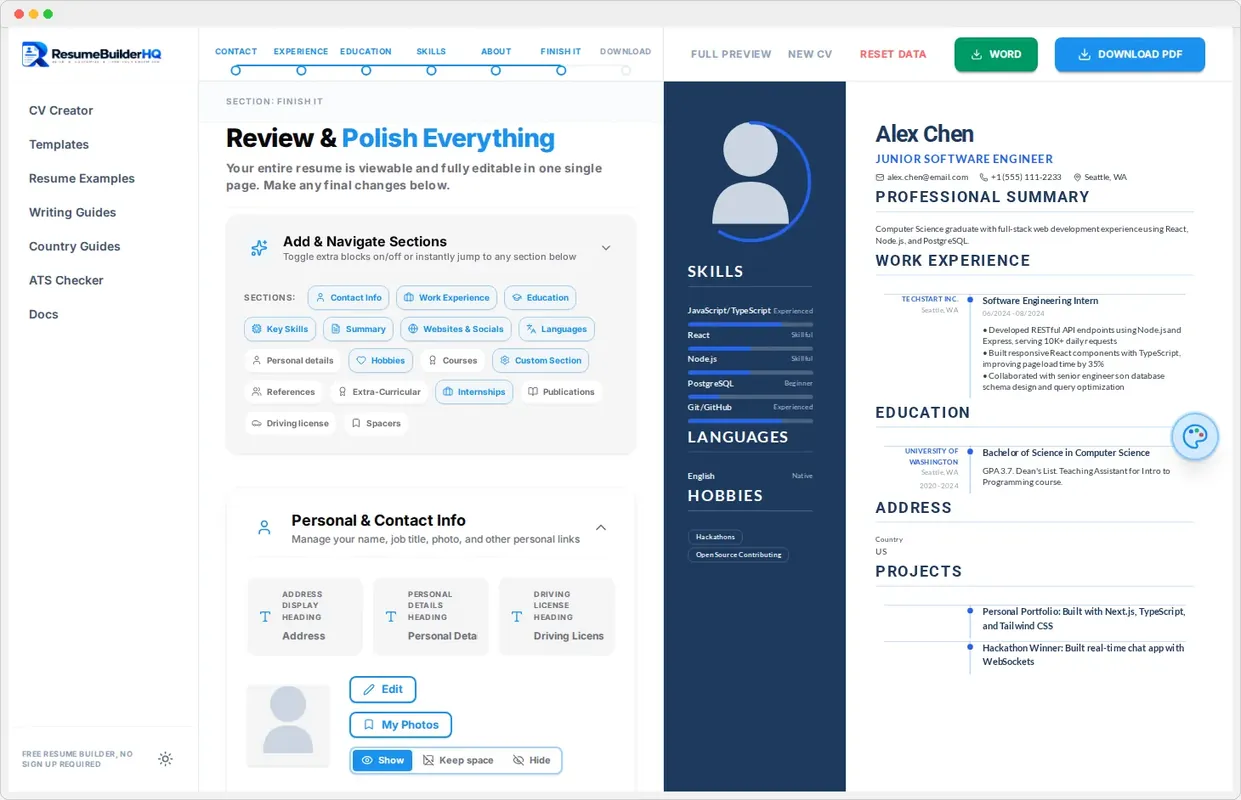
The Review step, called Finish It in the wizard, shows your entire resume on one page. It is the closest thing to a professional proofread pass inside the builder. Use it before you download.
See everything in one place
The Review step combines the editor and your full resume. You can read the whole document from top to bottom, notice what is missing, and spot small errors that are easy to miss one panel at a time.
Edit any section directly
Review is not read-only. Click any part of the preview to jump to the matching editor panel, make your change, and see it update instantly. This is the fastest way to fine-tune spacing and wording.
The Add & Navigate Sections toolbar
The Review step includes a sticky toolbar that lists every section of your resume. Use it to:
- Jump to any section with one click.
- Add extra sections like languages, hobbies, references, internships, publications, or a custom section.
- Remove sections you do not want.
Tip
Reorder with drag and drop
Drag any section card in the preview to change its position. Lead with the strongest content for your target role. This is also where you can push the whole resume onto a single page.
Check page fit
Watch the preview as you review. If the resume spills onto two pages and you prefer one, trim a bullet or tighten the layout in the Design rail. The Layout guide explains how to fit everything neatly.
Next: download
Happy with how it reads? Move to the Download step to export your resume as PDF or Word.